

Documentation: Smart Home Integrations
Here you will find detailed instructions for integrating the Abfall-Abfrage Converter into various smart home systems. Select the desired system from the tabs below.
Home Assistant integration
Prerequisites
- A working Home Assistant installation
- Access to HACS (Home Assistant Community Store)
- Your personal link code from the Abfall-Abfrage Converter
Step-by-step instructions
Install Waste Collection Schedule
First install the "Waste Collection Schedule" integration via HACS (Home Assistant Community Store).
Dies ist die offizielle Integration für Home Assistant. Go to GitHub
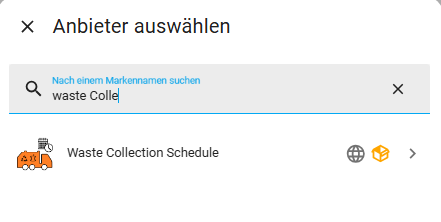
Add integration
In Home Assistant, go to Settings → Devices & Services → Add Integration and search for Waste Collection Schedule.
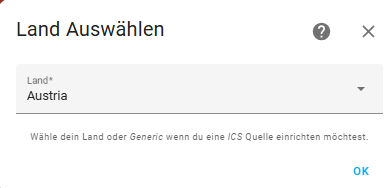
Select country
In the next step, select Austria as the country.
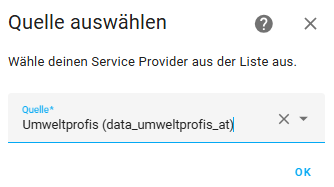
Select service provider
Select data_umweltprofis_at as the service provider.
Insert XML URL
Generate your XML code on the page abfall-abfrage.com and insert the full URL into the xmlurl field:
https://abfall-abfrage.com/abfall/public/xml.php?code=YOUR_CODE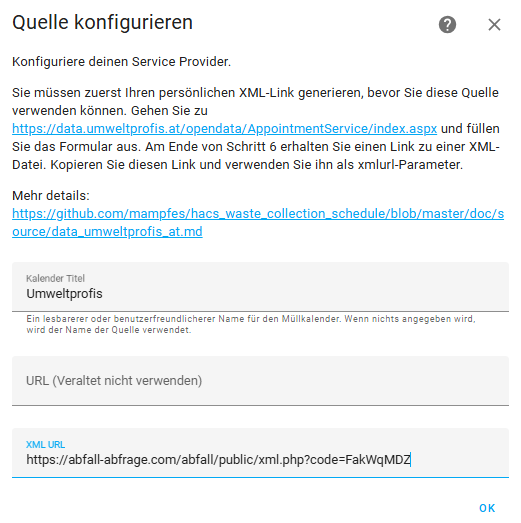
Done!
The integration is now complete. Your waste collection dates will be displayed in Home Assistant.
YAML configuration (alternative)
Alternatively, you can also configure the integration via YAML. Add the following configuration to your configuration.yaml file:
waste_collection_schedule:
  sources:
    - name: data_umweltprofis_at
      args:
         xmlurl: https://abfall-abfrage.com/abfall/public/xml.php?code=YOUR_CODE
      customize:
        - type: Restabfall
          alias: Restabfall
          picture: https://abfall-abfrage.com/abfall/public/assets/img/restabfall/Restabfall-ha.png
        - type: Altpapier
          alias: Altpapier
          picture: https://abfall-abfrage.com/abfall/public/assets/img/papier/Altpapier-ha.png
        - type: Gelber Sack
          alias: Gelber Sack
          picture: https://abfall-abfrage.com/abfall/public/assets/img/gelbersack/Gelbersack-ha.png
        - type: MASI
          alias: MASI
          show: true
          picture: https://abfall-abfrage.com/abfall/public/assets/img/masi/Masi-ha.png
      calendar_title: Abfallkalender
  day_switch_time: "13:00"
  fetch_time: "04:00"
Replace YOUR_CODE with your personal link code and adjust the waste types and images as needed.
Display in Home Assistant
After successful installation, you can display the waste collection dates in Home Assistant in various ways:
- Automations: Create automations to notify you of upcoming collection dates.
- Lovelace cards: Use special cards like "auto-entities" or "Upcoming Events List Card" to display the next collection dates.
- Calendar view: Add the waste calendar to your calendar view.
You can use the images found on the waste images page to visually enhance your Lovelace cards.
Tips & troubleshooting
- Error with the integration: Check that the URL is correct and your link code is valid.
- No dates visible: Make sure the iCal URL in your profile is correct.
- Adjust waste type names: You can adjust the names of the waste types in your profile.
- Error in log: Check the Home Assistant logs for possible error messages when processing the data.
- Switch time: Set
day_switch_timein YAML (e.g."13:00"). The JSON API uses the same parameter:&day_switch_time=10:00(default 12:00, timezone Europe/Vienna).